TGX Account
Whether it’s cross-border e-commerce, taking brands global, or an advertising campaign team, Facebook accounts are core assets of the entire business. An account is often linked to advertising accounts, Pages, follower data, and marketing content. Once a problem occurs, the losses go far beyond the account itself.
Many people have had similar experiences: frequent changes in the login environment causing an account to be banned, leaked passwords resulting in stolen funds, or improper permission allocation leading to team data loss. These security risks may seem minor, but they can be enough to ruin an entire project.
Therefore, systematically securing a Facebook account is no longer an “optional” task, but a basic requirement that must be completed. For teams that need to quickly obtain high-quality accounts and avoid registration risks, the established account resources provided by the TGX platform can help establish operations on a more secure foundation from the very first step.
Why Account Security Matters
Facebook’s risk-control mechanisms are becoming increasingly strict. The platform monitors users’ login habits, operation frequency, and device environment. Any unusual activity may trigger verification or even result in a direct account ban.
An account is not merely a login credential; it is also an “online asset” for a business. The advertising accounts, page followers, and marketing data linked to it are all irreplaceable resources. Once an account is hacked or banned, advertising campaigns may be interrupted immediately, funds spent may be impossible to recover, and the brand’s reputation may also be damaged.
For cross-border sellers and operations teams, a secure and stable account means that advertising campaigns can continue, follower growth will not be interrupted, and business data can be accumulated completely. In contrast, an insecure account is like a light bulb that may go out at any moment, leaving the entire project in darkness.
This is also why many teams choose to rely on high-quality accounts from the TGX platform—these accounts have been optimized in terms of their environment and information, helping reduce the risks of registration and account maintenance while providing a more stable foundation for subsequent security settings.
Core Steps for Account Security Settings
1. Login Environment Security
The first line of defense for account security is the login environment. Many accounts are banned not because the operations themselves violate the rules, but because the login environment is too “abnormal.”
-
Keep the device and IP stable: Do not frequently switch devices or regions to log in within a short period.
-
Use a clean browser environment: Avoid having multiple accounts share the same browser cache.
-
Dedicated VPN or independent network environment: Provide the account with a stable internet environment to reduce the risk of abnormalities.
Case: A seller frequently switched between multiple accounts on the same computer, triggering Facebook’s risk controls within just one week and causing all of the advertising accounts to be banned.
Solution: Log in using an independent environment, or directly use accounts provided by the TGX platform. These accounts have typically been maintained in a stable environment, resulting in lower risks.
2. Enable Two-Factor Authentication (2FA)
Passwords are never the safest barrier; two-factor authentication is the key.
-
What is 2FA: When logging in to an account, in addition to entering the password, you also need an SMS verification code or a dynamic code from an authenticator.
-
How to enable it: You can bind a mobile phone number or use tools such as Google Authenticator.
-
Best practice: Do not use the same verification method as other social platforms. It is recommended to bind a dedicated business mobile phone number.
After enabling 2FA, even if the password is compromised, it is difficult for hackers to log in to the account.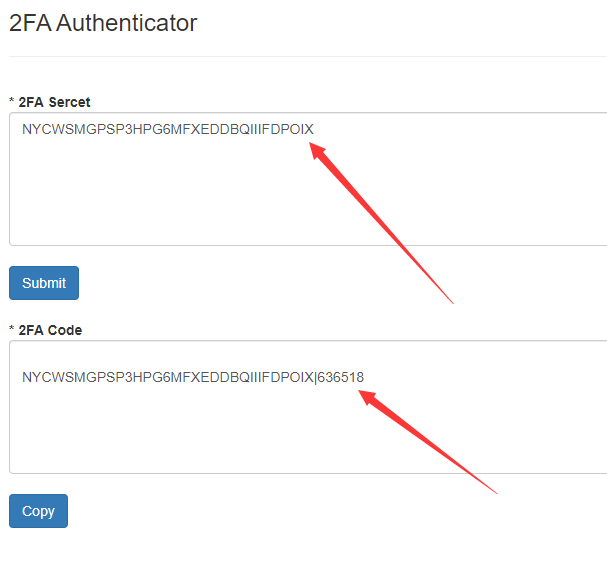
3. Manage Passwords and Recovery Options
Account password management is equally important, as many accounts are compromised due to overly simple or reused passwords.
-
Set strong passwords: Include at least uppercase and lowercase letters, numbers, and symbols, with a length of no fewer than 12 characters.
-
Change passwords regularly: Update them every three to six months to avoid long-term exposure to risks.
-
Email security: The email address used as a recovery entry point should also have a strong password and two-factor authentication enabled.
-
Add trusted contacts: When an account is locked, trusted friends can assist with account recovery.
4. Permission and Team Member Management
For business accounts, team collaboration is unavoidable, but improper permission allocation often creates security risks.
-
Assign permissions by level: Assign different permissions according to members' responsibilities, such as administrator, advertiser, and editor.
-
Avoid centralized control: Do not let a single member hold all permissions.
-
Review permissions regularly: Promptly remove account permissions from departing employees or accounts that are no longer in use.
Case: An advertising team suffered heavy losses after an administrator account was compromised, causing the funds in the advertising account to be maliciously depleted.
Solution: Allocate permissions appropriately and use the permission management tools of TGX enterprise accounts to reduce risks.
5. Privacy Settings and Data Protection
Privacy settings are often overlooked, but they are an important supplement to account security.
-
Check privacy options: Limit who can see content and who can send friend requests.
-
Disable unnecessary app connections: Reduce the risk of third-party apps accessing data.
-
Enable login alerts: Receive a notification as soon as a new device logs in.
These settings not only protect the account but also help prevent corporate data leaks.
6. Anomaly Monitoring and Emergency Measures
Even with thorough security measures in place, an emergency response mechanism should still be established.
-
Check login records regularly: Check the account settings to see whether there are any unfamiliar devices.
-
Handle anomalies: When an unfamiliar login is detected, change the password immediately and force a logout.
-
Freeze the ad account: If abnormal activity occurs in ad campaigns, immediately suspend the payment method.
-
Recovery channels: Learn how to use Facebook’s official “account recovery tool.”
For large-scale operations teams, if a primary account is at risk, using a backup account on the TGX platform can quickly fill the gap and prevent business interruptions.
Frequently Asked Questions and Solutions
Q1: Can a suspended account still be recovered?
You can try appealing or submitting the required materials, but the process is time-consuming and success is not guaranteed. A backup account is essential.
Q2: Will frequently changing IP addresses result in a ban?
Yes, Facebook’s risk-control mechanism is highly sensitive, so it is recommended to keep the login environment stable.
Q3: Is it safe for a team to share one account?
The risk is extremely high. An enterprise account should be used, with security ensured through permission allocation.
V. Summary and Call to Action
Account security is the underlying logic of Facebook operations. From the login environment to password management, and from permission allocation to privacy protection, every aspect is crucial. Only by establishing a comprehensive security system can you ensure that advertising campaigns run smoothly and that data and funds remain protected.
If you are already running Facebook ads or preparing to expand overseas, now is the best time to check your account security settings. For teams looking to quickly obtain stable accounts, the high-quality account resources provided by the TGX platform can reduce risks from the very beginning and provide protection for subsequent operations.
Take action now: Check your account security settings, properly manage your login environment and permissions, and prepare backup accounts for your team. This will make your operations more stable and sustainable.
📩 Official website: https://www.tgxaccount.com?from=2116
💁♀️Telegram customer service: https://t.me/TGXaccounts