TGX Account
I. Why “Phone Number Verification” Is a Key Step Where Many People Get Stuck
Registering for Instagram may seem like a simple process, but phone number verification often becomes the point where many people get stuck. Generally speaking, the registration process includes downloading the Instagram app or accessing the registration page through the website, then entering a phone number (including the country code) or email address, receiving a verification code, and activating the account after verification. This step should be smooth, but many users in mainland China encounter problems at this stage.
There can be many reasons for these problems: domestic phone numbers may not support receiving international verification SMS messages, the country code may be entered incorrectly, SMS messages may be blocked by the carrier or marked as spam, the network/VPN status may be unstable, the Instagram system may be experiencing delays, or the user’s IP address/location may be flagged as abnormal by Instagram’s security system. These issues may result in you not receiving a verification code even after entering your phone number, or being unable to complete verification in the app/web version even if you do receive one.
When this happens, many people feel both anxious and helpless because they do not know exactly where the problem lies. This article will guide you through the possible causes step by step and provide multiple solutions. If you have tried everything and it still does not work, you can also consider a backup option — purchasing an already verified account, such as through the TGX overseas account marketplace. After learning about these options, you will have a clearer understanding of the advantages, disadvantages, and risks of each path.
II. Common Reasons for Phone Number Verification Failure
First, we need to understand which factors may cause verification to fail and what checks and adjustments you can make in these areas.
Reason 1: Incorrect Phone Number Format or Country Code
Many people fail to receive verification codes because they enter the wrong country code or use an incorrect format. For example, they forget to add “%2B”, or enter “0086” when the system only supports “%2B86”; in some regions, they may enter too many or too few leading zeros; spaces, parentheses, hyphens, and other symbols included when entering the phone number may also be misinterpreted. Even when the entire network and system are functioning normally, these minor errors can be enough to disrupt SMS routing. The solution is to write the phone number as “strictly” as possible: country code %2B number, with no spaces or symbols in between, and confirm whether the leading zero is unnecessary.
Reason 2: Network connection or SMS/email delivery delays
An unstable network can cause errors when Instagram requests a verification code. If you are using a VPN or proxy tool, it may affect the verification code request or Instagram's server response. After an SMS is sent by the carrier or service provider, it may sometimes be delayed due to cross-border transmission or carrier policies. Email verification may also be delayed by the email system's spam filters or other filtering mechanisms.
How to deal with it: First confirm that your network environment is stable, and try switching or turning off the VPN; switch to a different network (such as WiFi or mobile data); check whether your phone's power-saving mode is affecting background activity; wait for a certain amount of time (sometimes from a few minutes to half an hour) before trying again.
Reason 3: Carrier blocking or SMS being mistakenly processed as spam
Among domestic mobile carriers, some messages are easily categorized as spam, advertising messages, or restricted international messages. SMS service provider regulations or regional policies may restrict the receipt of certain short-code or international messages. The phone's own security software or message-blocking/filtering functions may also interfere with receiving verification code messages.
You can check your phone's SMS spam folder and filtering settings to confirm whether security software is blocking messages; contact your carrier to confirm whether international messages are blocked; try using a different phone number (from a different carrier); if you have a friend in another country or region, you can borrow their phone number for testing.
Reason 4: System security restrictions or too many verification code requests
If you are requesting verification codes frequently, you may trigger Instagram's security mechanisms. The system may consider this abnormal behavior and temporarily suspend verification code delivery. You may see a “Please try again later” prompt. Another possibility is that the IP address or device has been flagged as risky, which can affect the verification process.
Solutions include: reducing the frequency of verification code requests; leaving a longer interval between each attempt; confirming that the entered information is correct before submitting; if the IP address is suspicious (for example, VPN nodes are often blocked), switching to a more stable or reputable node.
Reason 5: IP/Region/VPN Causing Verification Issues
Instagram's security system detects whether the registrant's IP address and device information are abnormal. If you use a VPN or proxy and the IP location differs greatly from the region associated with your phone number, this may be identified as abnormal behavior. If an VPN node is deemed a “suspicious source” by Instagram, the verification code or registration process may be blocked.
It is recommended to use a network node that matches the region of your phone number as closely as possible; ensure that your device time zone is consistent with your network location; if possible, register using a regular network rather than a VPN; if you must use a VPN, choose a reputable, low-latency, stable node.
IV. Practical Solutions After Phone Number Verification Fails
When you encounter phone number verification failure, try the following solutions in order:
-
Carefully check the phone number and country code format again to ensure they are entered correctly, without extra symbols or spaces.
-
Try switching network environments, including turning off the VPN or proxy and using mobile data or another WiFi network.
-
Try a different phone number, preferably from a different carrier. You can also borrow an international phone number from a friend.
-
Use email registration instead. Instagram supports registration by email, allowing you to bypass SMS issues.
-
Wait for a while before trying again, as the system may be experiencing temporary delays or restrictions.
-
Check whether the SMS app or system settings on your phone have automatic blocking or filtering features that may be affecting SMS reception.
-
If you have confirmed that you have tried all of these methods, consider contacting your mobile carrier or Instagram customer service to find out whether there is a systemic issue.
V. Backup Option: Purchase a Verified Account
If you have tried all legitimate methods but still cannot resolve the issue, and you need an account urgently or want to start operating one quickly, you may consider purchasing an Instagram account that has already been verified by phone number or fully registered. This is a fast but risky option.
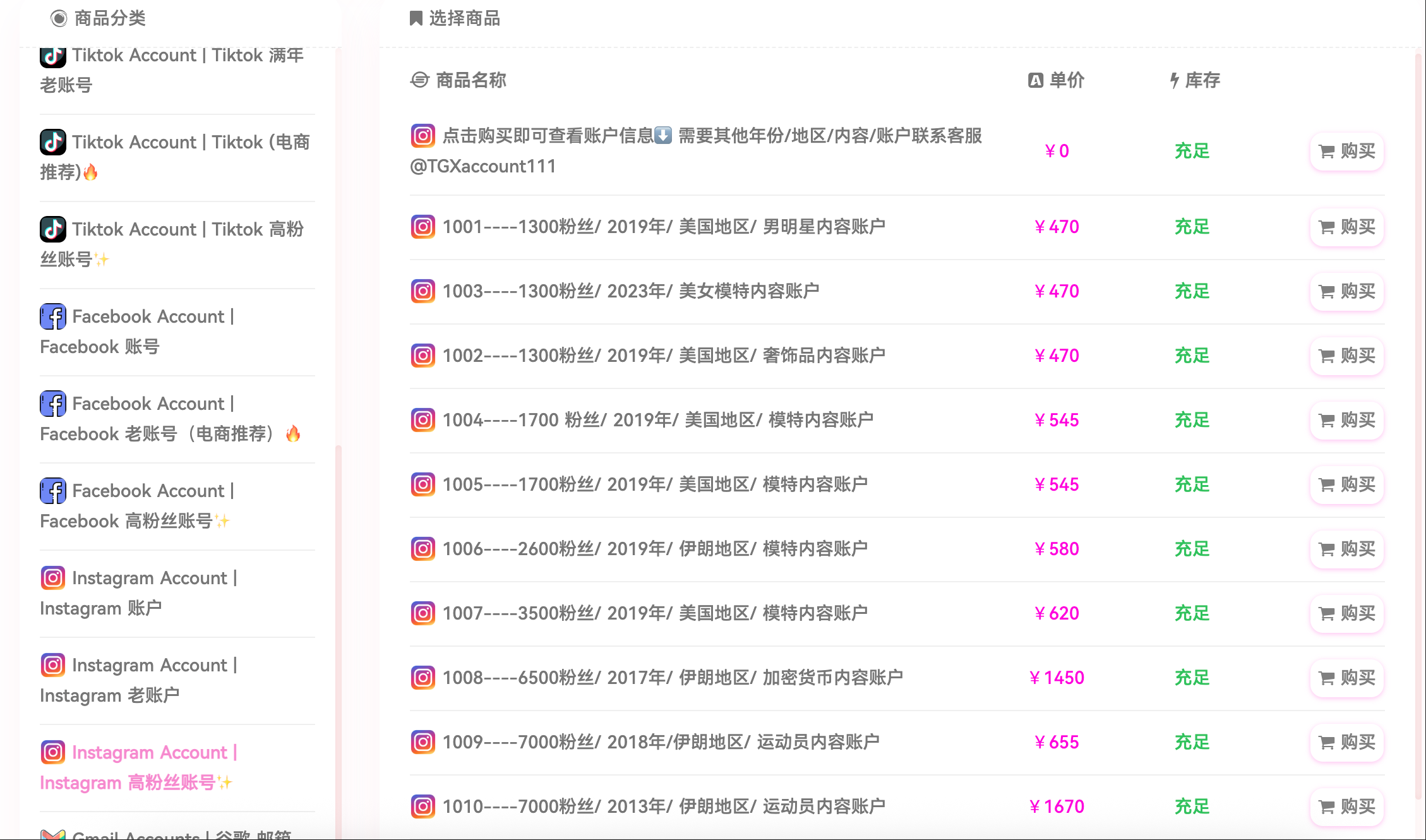
You can find such accounts on the TGX overseas account marketplace. TGX is a platform specializing in the sale of social media accounts, including Instagram. The platform offers cheap accounts as well as accounts with thousands/tens of thousands of followers, and supports filtering accounts by region.
Cheap accounts generally have fewer followers and lower prices, making them suitable for trial use or those with limited budgets; accounts with thousands or tens of thousands of followers already have a certain follower base, giving them an advantage over blank accounts for content promotion or initial operations. If your target followers are mainly in a particular country or market, you can also choose accounts whose location or follower distribution is close to that region, so that content or advertising can be targeted more precisely.
Six. Services and Features of the TGX Overseas Account Marketplace
The TGX platform has the following features worth knowing:
-
It provides clearly categorized accounts for sale, including Instagram accounts. You can browse purchasable account products in the Instagram category.
-
It supports payment methods such as Alipay and USDT, making payment convenient for users in mainland China.
-
After purchasing an account, it is recommended to “age” the account for three days before modifying the account information, and to remove unfamiliar devices within 24 hours to improve account security.
Seven. Risks and Precautions When Purchasing an Account
Although purchasing an existing account can bypass the difficulties of registration, you must understand the associated risks and take precautions during both the purchasing process and use.
First, this type of account trading is generally prohibited or restricted under Instagram’s Terms of Service. Once detected by the platform, the account may be banned or have its functions restricted.
Second, a high follower count does not necessarily indicate genuine quality or engagement rate. The account may have purchased or fake followers, and using such accounts for promotion or content publishing may produce weak results.
Third, control of the account must be transferred completely: Has the seller retained the original linked email address/phone number? Are there any traces of control left in the backend or forums? After obtaining the account, it is best to immediately change the password, email/phone binding, enable two-step verification, and clear records of logins from unknown devices.
Keep your network environment clean: use a stable IP, avoid frequently changing locations or devices; don’t make your content too aggressive all at once after going live.
Although phone number verification failure is troublesome, in most cases it can be resolved by carefully checking the format and network status, or by registering with a different phone number or email address. Buying an account is only a backup option when there is truly no solution through official channels. If you decide to go this route, TGX is a platform worth considering, offering cheap accounts, accounts with thousands/tens of thousands of followers, and the ability to filter accounts by region. However, be mindful of the risks and practice safe operations.
📩 Official website: https://www.tgxaccount.com?from=2462
💁♀️Telegram customer service: https://t.me/TGXaccounts